
Best Payroll Software for Small Business (2026)
Why Payroll Software Matters for Small Businesses in 2026
What is the best payroll software for small business in 2026?
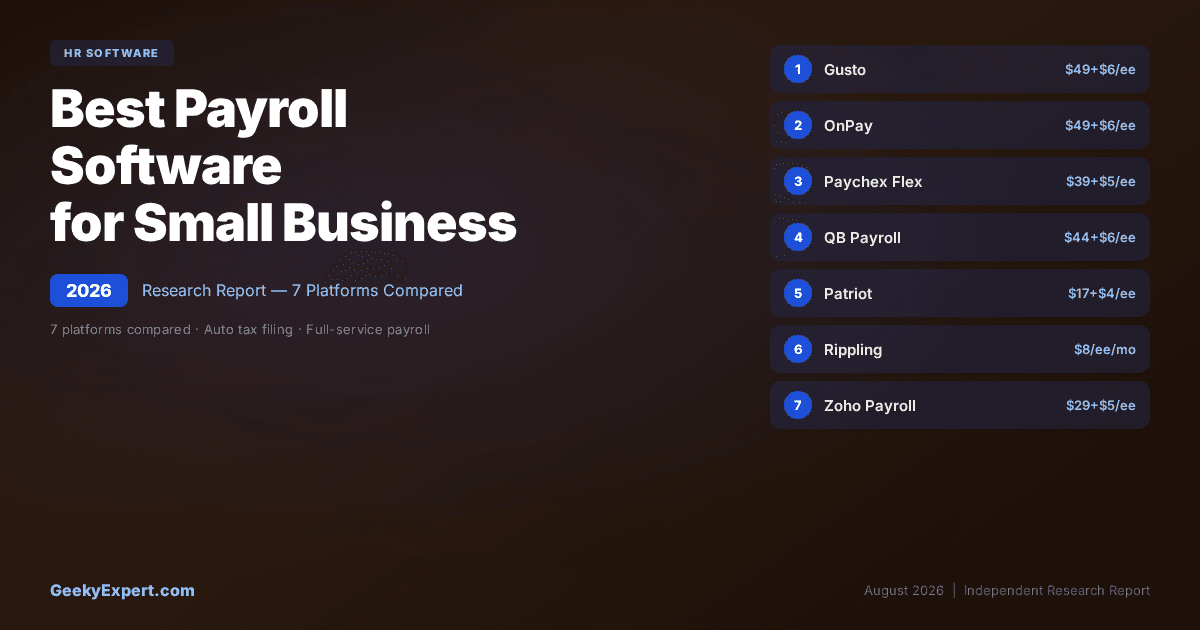
The best payroll software for small business in 2026 is Gusto -- it provides full-service payroll with automated tax filing in all 50 states, benefits administration, onboarding, and compliance tools starting at $49/month + $6/employee. OnPay matches Gusto on price with a single flat plan that includes every feature with no upsells. Patriot Payroll is the lowest-cost option at $17/month + $4/employee.
Best for your situation
- ▸Best overall SMB payroll: Gusto -- $49/mo + $6/ee
- ▸No-upsell flat plan: OnPay -- $49/mo + $6/ee
- ▸Lowest cost payroll: Patriot -- $17/mo + $4/ee
- ▸QuickBooks users: QuickBooks Payroll -- $44/mo + $6/ee
VERIFIED PLATFORM & PRICING DATA (2026)
| Platform | Entry Price | Strength | Rating / Note |
|---|---|---|---|
| Gusto | $49/mo + $6/ee | All-in-one payroll + benefits + HR | G2 4.5+; top SMB pick |
| OnPay | $49/mo + $6/ee | Single flat plan, no upsells | G2 4.8+; all features included |
| Paychex Flex | $39/mo + $5/ee | Scalable to PEO/HR outsourcing | G2 4.2+; enterprise path |
| QuickBooks Payroll | $44/mo + $6/ee | Deepest accounting integration | G2 4.0+; QuickBooks native |
| Patriot Payroll | $17/mo + $4/ee | Lowest-cost payroll solution | G2 4.7+; budget-friendly |
| Rippling | $8/ee/mo base | IT + HR + Payroll unified platform | G2 4.8+; automation leader |
| Zoho Payroll | $29/mo + $5/ee | Best for Zoho ecosystem | G2 4.4+; ecosystem play |
The True Cost of Payroll Errors
THE COST OF GETTING PAYROLL WRONG
Manual vs. Automated Payroll
| Manual Approach | Automated Payroll | |
|---|---|---|
| Manual tax calculations | → | Auto-calculated, auto-filed |
| Paper checks + manual deposits | → | Direct deposit in 1-2 days |
| Separate benefits vendors | → | Benefits brokered + administered in-platform |
What to Optimise For When Choosing SMB Payroll
Choosing the right payroll platform depends on your business's primary constraint -- whether that's budget, feature breadth, accounting integration, or growth trajectory. The three most common optimisation targets map to different platforms.
THREE OPTIMISATION TARGETS FOR SMB PAYROLL
| Optimisation Target | Platform | Approach | Best When |
|---|---|---|---|
| All-in-One SMB Platform | Gusto | Payroll + benefits + HR + onboarding in one | You want one vendor for payroll, benefits, and basic HR |
| Lowest Possible Cost | Patriot Payroll | Basic full-service payroll at budget pricing | You need reliable payroll but have a tight budget |
| Accounting Integration | QuickBooks Payroll | Native payroll inside QuickBooks accounting | You already use QuickBooks and want zero-friction payroll sync |
Featured HR Tech & Employee Experience
Gusto -- Best All-in-One Payroll for Small Business

Gusto is the best payroll software for small businesses in 2026 for companies that want payroll, benefits administration, onboarding, and compliance tools in a single platform. Rather than cobbling together separate vendors for payroll processing, health insurance, and HR basics, Gusto consolidates everything into one system designed specifically for SMBs -- with transparent pricing at $49/month + $6/employee and no mandatory sales calls to get started.
GUSTO AT A GLANCE
| Attribute | Detail |
|---|---|
| Entry price | $49/month + $6/employee |
| G2 Rating | 4.5+ |
| Tax filing | All 50 states, automated |
| Benefits | Health, dental, vision, 401(k), HSA, FSA |
| Setup time | 1--2 weeks |
Honest Limitation
The $49/month base fee makes Gusto one of the more expensive options for very small teams (under 5 employees) -- Patriot's $17/month base saves $384/year before per-employee costs. Customer support has drawn criticism for long wait times during peak periods (year-end, tax season). The Simple plan ($49/mo) lacks some features like time tracking and next-day deposit, pushing many SMBs to the Plus plan ($80/mo + $12/ee), which significantly increases cost. Not suitable for companies with complex multi-state or international payroll needs beyond basic US operations.
Best For
Small businesses with 5--100 employees that want payroll, benefits administration, onboarding, and basic HR in one platform with transparent pricing and no mandatory sales calls. Particularly strong for companies offering their first employee benefits package.
OnPay -- Best Single-Plan Payroll With No Upsells

OnPay is the best payroll platform for small businesses that want every feature included in a single flat plan with no tier-gating or upsells. At $49/month + $6/employee, OnPay matches Gusto's base pricing but includes every feature in one plan -- no Simple vs. Plus vs. Premium confusion. Every customer gets the same payroll, benefits, HR, and onboarding capabilities regardless of company size. G2 rating 4.8+.
ONPAY AT A GLANCE
| Attribute | Detail |
|---|---|
| Price | $49/month + $6/employee |
| G2 Rating | 4.8+ |
| Plans | Single plan, all features included |
| Tax filing | All 50 states, automated |
| Setup time | 1--2 weeks |
Honest Limitation
The user interface, while functional, is less polished than Gusto's modern design -- OnPay prioritises utility over aesthetics. Benefits options are more limited than Gusto's full brokerage -- OnPay partners with brokers but offers fewer plan choices in some states. Fewer third-party integrations than Gusto or Rippling -- the integration library is narrower, which may matter if you use niche tools. No mobile app for employers (employees have self-service mobile access). Less brand recognition, which can make stakeholder buy-in harder if your team expects a well-known name.
Best For
Small businesses with 5--50 employees that are frustrated by tiered pricing and want predictable costs with every feature included from day one. Particularly strong for businesses that have been burned by upsells from other payroll providers and want pricing they can trust.
Paychex Flex -- Best Scalable Payroll With PEO Path

Paychex Flex is the best payroll platform for small businesses that expect to grow beyond basic payroll into PEO services, HR outsourcing, or enterprise-grade compliance. Starting at $39/month + $5/employee for basic payroll, Paychex offers a clear upgrade path from self-service payroll to full PEO (Paychex PEO) without requiring a platform migration -- making it the strongest choice for SMBs planning significant headcount growth.
PAYCHEX FLEX AT A GLANCE
| Attribute | Detail |
|---|---|
| Entry price | $39/month + $5/employee |
| G2 Rating | 4.2+ |
| Scalability | Payroll to PEO in same platform |
| Compliance | Dedicated compliance specialists |
| Setup time | 2--4 weeks |
Honest Limitation
Pricing is less transparent than Gusto or OnPay -- the advertised $39/month base is for the Essentials plan, and the sales-driven pricing model means costs can vary significantly based on negotiation. The G2 rating of 4.2+ is the lowest in this comparison, with complaints concentrated on the user interface feeling dated compared to modern competitors and inconsistent customer service experiences. Add-on costs for features like time tracking, benefits administration, and HR tools can push total cost well above initial quotes. The platform's enterprise heritage means the SMB experience sometimes feels like a simplified version of an enterprise product rather than an SMB-native design.
Best For
Small businesses with 10--100 employees that expect significant headcount growth and want a payroll platform that scales to PEO or HR outsourcing without requiring a migration. Particularly strong for businesses in regulated industries that value having a dedicated compliance specialist.
QuickBooks Payroll -- Best for QuickBooks Accounting Integration

QuickBooks Payroll is the best payroll solution for small businesses already using QuickBooks for accounting. The native integration eliminates double data entry, automatically syncs payroll expenses to the correct general ledger accounts, and provides a unified financial view that no third-party integration can match. Starting at $44/month + $6/employee for the Core plan, it includes full-service payroll with tax penalty protection.
QUICKBOOKS PAYROLL AT A GLANCE
| Attribute | Detail |
|---|---|
| Entry price | $44/month + $6/employee |
| G2 Rating | 4.0+ |
| Differentiator | Native QuickBooks integration |
| Tax protection | Tax penalty protection included |
| Setup time | 1--2 weeks |
Honest Limitation
The G2 rating of 4.0+ is among the lowest in this comparison, with complaints focused on customer support quality and the tiered pricing that locks time tracking and same-day deposit behind the Premium ($75/mo + $8/ee) and Elite ($125/mo + $11/ee) plans. HR features are minimal compared to Gusto or OnPay -- QuickBooks Payroll is a payroll tool with accounting integration, not an HR platform. Benefits administration is outsourced through partnerships rather than built in-house, resulting in a less integrated experience. If you do not use QuickBooks for accounting, the native integration advantage disappears entirely and competing platforms offer better standalone payroll value.
Best For
Small businesses with 5--75 employees that already use QuickBooks Online or QuickBooks Desktop for accounting and want seamless payroll-to-accounting sync without manual journal entries. Not recommended for businesses that don't use QuickBooks or that need comprehensive HR features beyond payroll.
Patriot Payroll -- Best Budget Payroll for Small Teams

Patriot Payroll is the lowest-cost full-service payroll solution for small businesses in 2026. At $17/month + $4/employee for full-service payroll (tax filing included), Patriot costs less than half of Gusto or OnPay on a per-month basis. For a 10-person company, that translates to $57/month vs. $109/month -- a $624/year savings that matters for bootstrapped businesses and lean operations.
PATRIOT PAYROLL AT A GLANCE
| Attribute | Detail |
|---|---|
| Full-service price | $17/month + $4/employee |
| Basic (self-service) | $10/month + $4/employee |
| G2 Rating | 4.7+ |
| Tax filing | All 50 states (full-service plan) |
| Setup time | Under 1 week |
Honest Limitation
No built-in benefits administration -- health insurance, 401(k), and other benefits require separate vendors, which eliminates the consolidation advantage that Gusto provides. The user interface is functional but noticeably less modern than Gusto or OnPay. Fewer integrations than competitors -- the integration library is limited primarily to QuickBooks. The modular pricing can undercut the budget advantage if you add time tracking and HR ($29/month + $8/employee total), approaching OnPay's pricing with fewer features. No mobile app for employers. Limited scalability for companies growing beyond 50+ employees.
Best For
Small businesses and startups with 1--25 employees that need reliable full-service payroll at the lowest possible cost and do not require built-in benefits administration. Ideal for bootstrapped businesses, sole proprietors with a few employees, and companies that already have separate benefits vendors.
Rippling -- Best Unified IT + HR + Payroll Platform

Rippling is the best payroll platform for small businesses that want to unify IT, HR, and payroll into a single automated system. Starting at $8/employee/month as a base platform fee (payroll module priced separately), Rippling's differentiator is automation breadth: when you hire an employee, Rippling can run payroll, enroll them in benefits, provision their laptop, set up their email and Slack accounts, and assign software licenses -- all from a single workflow. G2 rating 4.8+.
RIPPLING AT A GLANCE
| Attribute | Detail |
|---|---|
| Base platform | $8/employee/month |
| G2 Rating | 4.8+ |
| Differentiator | IT + HR + Payroll unified automation |
| Global | Global payroll in 50+ countries |
| Setup time | 2--4 weeks |
Honest Limitation
Pricing is opaque: the $8/employee/month is the base platform fee, and payroll is an additional module priced through sales. Total cost with payroll + HR + IT modules can exceed $20--$35/employee/month, making Rippling significantly more expensive than Gusto or OnPay for payroll alone. The platform's breadth creates a steeper learning curve -- small businesses that only need basic payroll will find Rippling over-engineered for their requirements. Sales-driven pricing with no transparent self-service option means you must go through a demo and quote process. The modular architecture means you can buy payroll alone, but the value proposition weakens substantially without the IT and HR modules.
Best For
Tech-forward small businesses with 20--200 employees that need unified IT + HR + Payroll automation, manage multiple SaaS applications, and want to automate employee lifecycle events across all three domains. Not cost-effective for businesses that only need basic payroll processing.
Zoho Payroll -- Best for Zoho Ecosystem Integration

Zoho Payroll is the best payroll software for small businesses already invested in the Zoho ecosystem. At $29/month + $5/employee, it offers competitive pricing with native integrations into Zoho Books (accounting), Zoho People (HR), Zoho Expense (expense management), and the broader Zoho One suite -- creating a unified business operations stack at a fraction of the cost of assembling separate best-of-breed tools.
ZOHO PAYROLL AT A GLANCE
| Attribute | Detail |
|---|---|
| Entry price | $29/month + $5/employee |
| G2 Rating | 4.4+ |
| Ecosystem | Zoho Books, People, Expense, CRM |
| Tax filing | US federal + state taxes |
| Setup time | 1--2 weeks |
Honest Limitation
US payroll capabilities are newer and less mature than Gusto, OnPay, or Paychex -- Zoho Payroll's US offering launched later and lacks some polish that more established platforms provide. Benefits administration is not built into Zoho Payroll -- you need separate vendors for health insurance, 401(k), and other benefits, which is a significant gap compared to Gusto. Local tax filing coverage is less comprehensive than Gusto or OnPay in complex multi-jurisdiction scenarios. Customer support for the US payroll product has a smaller team than Zoho's flagship products. If you are not already in the Zoho ecosystem, there is no standalone advantage over Gusto or OnPay at similar or lower price points.
Best For
Small businesses with 5--50 employees already using Zoho Books, Zoho People, or Zoho One that want payroll integrated into their existing Zoho ecosystem without adding another vendor. Not recommended for businesses outside the Zoho ecosystem or those needing comprehensive built-in benefits administration.
Frequently Asked Questions
How much does payroll software cost for a small business in 2026?
Small business payroll software in 2026 typically costs between $17--$49/month as a base fee plus $4--$8 per employee per month. Patriot Payroll is the lowest at $17/month + $4/employee for full-service payroll. Gusto and OnPay both charge $49/month + $6/employee. Paychex Flex starts at $39/month + $5/employee. QuickBooks Payroll begins at $44/month + $6/employee. Rippling uses per-employee-only pricing starting at $8/employee/month as a base platform fee with payroll as an additional module.
Zoho Payroll costs $29/month + $5/employee. For a 10-person company, monthly costs range from roughly $57 (Patriot) to $109 (Gusto/OnPay). Factor in whether you need benefits administration, time tracking, or HR features, which may be included or cost extra depending on the platform.
What features should I look for in small business payroll software?
Essential features for SMB payroll: automated federal, state, and local tax calculation and filing; direct deposit; W-2 and 1099 generation; employee self-service portal for pay stubs and tax documents; new hire reporting. Important but not universal: benefits administration (health, dental, vision, 401k), time tracking integration, employee onboarding workflows, PTO management, and accounting software integration (QuickBooks, Xero).
Advanced features to consider if growing: multi-state payroll support, workers' compensation administration, contractor payment management, and mobile access. Evaluate based on your headcount and growth plan -- a 5-person company that does not offer benefits needs different capabilities than a 50-person company with health insurance and a 401(k) plan.
What is the difference between self-service and full-service payroll?
Self-service payroll calculates wages and deductions but requires you to file tax forms and make tax payments yourself to federal, state, and local agencies. Full-service payroll handles everything: tax calculation, filing, payment, W-2/1099 generation, and new hire reporting. All seven platforms in this report offer full-service payroll. The price difference between self-service and full-service has narrowed significantly -- Patriot charges $17/month for full-service vs.
$10/month for basic self-service, a difference of only $84/year. For most small businesses, full-service payroll is worth the incremental cost to avoid IRS penalties from filing errors. The average IRS penalty per payroll tax error is approximately $845, which exceeds years of the self-service discount.
Can I switch payroll providers mid-year?
Yes, you can switch payroll providers at any time during the year, though switching at quarter-end or year-end is cleaner for tax reporting. Most modern payroll platforms (Gusto, OnPay, Rippling) offer migration assistance and will import your existing payroll data, year-to-date tax filings, and employee records.
Key steps: export all current payroll records and tax filings from your existing provider; ensure all pending tax payments are completed before cancelling; set up the new provider and run a parallel test payroll if possible; verify year-to-date totals match between old and new systems. Allow 2--4 weeks for the full transition.
The most important detail is ensuring your outgoing provider completes all pending tax filings before you cancel -- gaps in tax filing create IRS compliance issues that are expensive to resolve.
Do I need separate payroll software, or should I use my accounting software's payroll?
It depends on your priorities. If you already use QuickBooks, its built-in payroll offers the deepest accounting integration with automatic journal entries and zero data re-entry -- no third-party payroll integration matches the native sync quality. If you need robust benefits administration, employee onboarding, and HR features alongside payroll, a dedicated platform like Gusto or OnPay will outperform accounting add-on payroll modules.
Standalone payroll platforms generally offer stronger HR features, better employee self-service, and more comprehensive benefits options. Accounting-integrated payroll wins on bookkeeping efficiency and consolidated vendor management. For most small businesses with 10+ employees who offer benefits, a dedicated payroll platform provides better overall value.
For businesses under 10 employees with simple payroll needs and an existing QuickBooks setup, the accounting-integrated approach is often the pragmatic choice.
About Geeky Expert
Geeky Expert is a leading provider of research and insights, dedicated to helping businesses make informed decisions through comprehensive analysis.