
Best AI Coding Tools & Agents (2026)
Why AI Coding Tools Matter in 2026
The distinction between an AI code assistant and an AI coding agent is no longer academic. Assistants offer inline completions and chat windows inside your editor. Agents operate autonomously -- they read your project structure, understand architectural patterns, execute shell commands, run test suites, and iterate until the task is done. The most capable agents in 2026 handle complex refactors across dozens of files, migrate dependencies, and ship production-quality code with minimal human intervention.
What is the best AI coding tool in 2026?
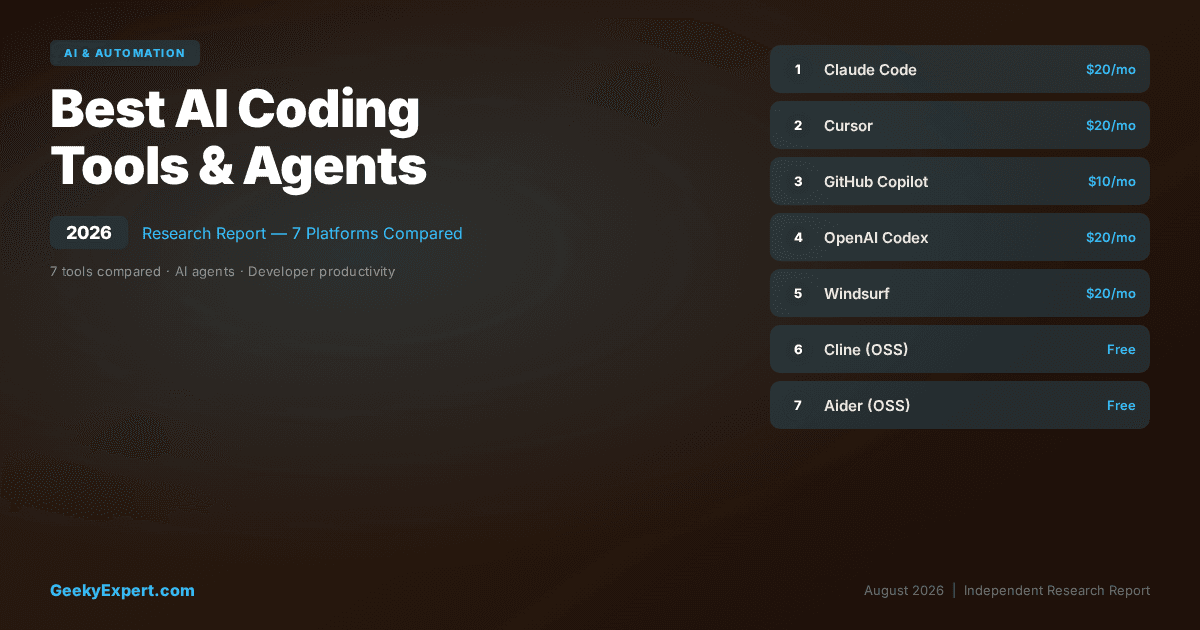
The best AI coding tool in 2026 is Claude Code -- it is a terminal-native autonomous coding agent that reads your entire codebase, makes multi-file edits, runs tests, and handles complex refactors from $20/month (Max plan). Cursor leads for developers wanting tight IDE integration. Cline is the best free open-source option (bring your own API key).
Best for your situation
- ▸Terminal-native agent: Claude Code -- $20/mo
- ▸AI-first IDE: Cursor -- $20/mo Pro
- ▸Widest editor support: GitHub Copilot -- $10/mo
- ▸Free + open source: Cline -- BYOK
VERIFIED PLATFORM & PRICING DATA (2026)
| Platform | Price | Type | Best For |
|---|---|---|---|
| Claude Code | $20/mo (Max) | Terminal agent | CLI-first developers |
| Cursor | $20/mo Pro | AI-first IDE | IDE-integrated workflows |
| GitHub Copilot | $10/mo Individual | IDE extension | Widest editor support |
| OpenAI Codex (CLI) | $20/mo (Plus) | Terminal agent | OpenAI ecosystem users |
| Windsurf | $15/mo Pro | AI IDE | All-in-one AI IDE on a budget |
| Cline | Free (BYOK) | VS Code extension | Control + customisation |
| Aider | Free (BYOK) | Terminal agent | Git-centric workflows |
The AI Coding Agent Revolution in Numbers
AI CODING TOOL ADOPTION DATA
The Shift
| AI Code Assistant (2023) | AI Coding Agent (2026) | |
|---|---|---|
| Single-line autocomplete | → | Multi-file autonomous editing |
| Chat window Q&A | → | Full codebase understanding + planning |
| Suggest code snippets | → | Run tests, fix failures, iterate autonomously |
| IDE-locked | → | Editor-agnostic terminal agents |
What to Optimise For
Choosing the right AI coding tool depends on your workflow preferences, project complexity, and whether you value IDE integration or terminal-first autonomy. The three most common buying scenarios map to different tools.
THREE OPTIMISATION TARGETS FOR AI CODING TOOLS
| Optimisation Target | Platform | Approach | Best When |
|---|---|---|---|
| Autonomous Agent Power | Claude Code | Terminal agent, full codebase context, test-driven iteration | You want an agent that handles complex refactors end-to-end without IDE dependency |
| IDE-Integrated Workflow | Cursor | VS Code fork, Tab completion, Composer multi-file edits | You want AI deeply embedded in your editor with visual diff review |
| Open Source + Full Control | Cline / Aider | Community-driven, bring your own model, full transparency | You want zero vendor lock-in, model flexibility, and complete visibility into AI actions |
Featured AI & Automation
Claude Code (Anthropic) -- Best Terminal-Native AI Coding Agent
CLAUDE CODE AT A GLANCE
| Attribute | Detail |
|---|---|
| Pricing | $20/mo (Max plan) |
| Core feature | Terminal-native autonomous coding agent |
| Model | Claude Sonnet / Opus (Anthropic) |
| Editor support | Any editor (editor-agnostic terminal tool) |
Honest Limitation
Requires terminal comfort -- developers who rely heavily on visual IDE features (debugging, breakpoints, visual git) may find the CLI-only interface limiting. Tied to Anthropic's Claude models with no option to swap in GPT-4 or Gemini. The Max plan's usage limits may be reached by power users on very large codebases during intensive sessions. No built-in visual diff preview -- you review changes in your own editor or git tool.
Best For
Senior developers and engineers who prefer CLI workflows, work across multiple editors or projects, and need an agent capable of handling large-scale architectural changes, complex refactors, and production-grade code generation across any language or framework.
Cursor -- Best AI-First Code Editor
CURSOR AT A GLANCE
| Attribute | Detail |
|---|---|
| Pricing | $20/mo Pro |
| Core feature | AI-first IDE with Tab, Chat, Composer |
| Models | Claude, GPT-4, Gemini (multi-model support) |
| Base | VS Code fork (full extension compatibility) |
Honest Limitation
Locked to the Cursor editor -- if you prefer JetBrains, Neovim, or Emacs, you must switch editors. The VS Code fork means occasional lag behind upstream VS Code updates. Pro plan usage limits can be reached during intensive sessions. Multi-file Composer edits, while powerful, require careful review as complex refactors can introduce subtle issues. Less effective than Claude Code for very large-scale architectural changes spanning dozens of files.
Best For
Developers who want AI coding capabilities deeply integrated into a visual IDE, prefer reviewing changes through visual diffs, and are comfortable using a VS Code-based editor as their primary development environment.
GitHub Copilot -- Most Widely Adopted AI Pair Programmer
GITHUB COPILOT AT A GLANCE
| Attribute | Detail |
|---|---|
| Pricing | $10/mo Individual, $19/mo Business |
| Core feature | Inline AI suggestions + Chat + Agent mode |
| Notable stat | 77,000+ organisations, millions of individual users |
| Editor support | VS Code, JetBrains, Neovim, Xcode, Visual Studio |
Honest Limitation
Inline suggestions are context-limited compared to Cursor's full codebase indexing -- Copilot primarily uses the current file and open tabs. Agent mode is functional but less capable than Claude Code for complex, multi-file architectural changes. Tied primarily to OpenAI models. The $10/month Individual plan has generous but finite usage limits. Code quality for complex tasks lags behind Claude Code and Cursor's best output. The "safe enterprise choice" positioning means innovation typically follows rather than leads.
Best For
Individual developers wanting affordable AI assistance across any major editor, and enterprise organisations needing a single, approved AI coding tool with IP indemnity, content exclusions, org-level policies, and broad editor support for large development teams.
OpenAI Codex (CLI) -- Cloud-Sandboxed Terminal Agent
OPENAI CODEX CLI AT A GLANCE
| Attribute | Detail |
|---|---|
| Pricing | $20/mo (ChatGPT Plus) |
| Core feature | Cloud-sandboxed agentic coding |
| Model | OpenAI o3/o4-mini (reasoning models) |
| Execution | Cloud sandbox (safe isolation) |
Honest Limitation
Still early in development compared to Claude Code and Cursor -- the tool is rapidly evolving but lacks the maturity and polish of more established alternatives. Cloud-sandboxed execution introduces latency compared to local execution. Limited to OpenAI models. The codebase context understanding is not as deep as Claude Code's full project indexing. Community and ecosystem are smaller than Cursor or Copilot. Some developers report inconsistent output quality on complex refactoring tasks.
Best For
Developers already invested in the OpenAI ecosystem who want a terminal-based coding agent with the safety guarantee of cloud-sandboxed execution, and who value multi-step reasoning capabilities for complex programming tasks.
Windsurf (Codeium) -- Best Budget All-in-One AI IDE
WINDSURF AT A GLANCE
| Attribute | Detail |
|---|---|
| Pricing | $15/mo Pro (strong free tier available) |
| Core feature | Cascade multi-step agent + Supercomplete |
| Base | VS Code fork with proprietary AI layer |
| Free tier | Yes -- generous autocomplete + limited Cascade |
Honest Limitation
Cascade's agentic capabilities are less reliable than Claude Code or Cursor's Composer on very complex multi-file refactors. The VS Code fork can lag behind upstream updates. Smaller community and extension ecosystem specific to Windsurf compared to Cursor. Enterprise features are less mature than GitHub Copilot's org-level controls. AI model quality for code generation is generally a step behind Cursor, particularly for complex architectural tasks.
Best For
Individual developers and small teams who want a full-featured AI IDE with agentic capabilities and strong autocomplete at a lower price point than Cursor, and who value a generous free tier for evaluation.
Cline (Open Source) -- Best Free AI Coding Agent for VS Code
CLINE AT A GLANCE
| Attribute | Detail |
|---|---|
| Pricing | Free (bring your own API key) |
| Core feature | Open-source agentic coding in VS Code |
| Models | Claude, GPT-4, Gemini, local models (any provider) |
| GitHub stars | 40,000+ (rapidly growing community) |
Honest Limitation
Bring-your-own-key means managing API costs yourself -- power users can easily spend $50--100/month on API calls, exceeding the cost of Cursor or Claude Code subscriptions. No built-in autocomplete or Tab suggestions -- Cline is an agent, not an inline assistant. VS Code only, unlike Claude Code's editor-agnostic approach. Setup requires configuring API keys and understanding model tradeoffs. Quality depends entirely on which model you choose and how well you prompt it. No enterprise support or SLAs.
Best For
Developers who want full transparency and control over their AI coding agent, want to use any LLM provider (including local models), and are comfortable managing their own API costs in exchange for zero vendor lock-in and complete customisation.
Aider (Open Source) -- Best Git-Centric Terminal Pair Programmer
AIDER AT A GLANCE
| Attribute | Detail |
|---|---|
| Pricing | Free (bring your own API key) |
| Core feature | Git-native terminal pair programming |
| Models | 40+ LLM providers (Claude, GPT-4, Gemini, DeepSeek, local) |
| Git integration | Auto-commits every change with descriptive messages |
Honest Limitation
Terminal-only interface with no visual IDE integration -- not suitable for developers who need inline completions or visual diff review. Bring-your-own-key model means API cost management falls on the user. Setup requires Python and pip installation, which is less streamlined than npm-based tools. The repository-map context approach is effective but not as comprehensive as Claude Code's full codebase indexing for very large monorepos. No enterprise features, SLAs, or vendor support. Quality varies significantly depending on model selection.
Best For
Developers who use git as their primary workflow tool, want automatic commits for every AI change, prefer terminal-based pair programming with any LLM provider, and value the flexibility of the dual-model architect + editor pattern for optimising quality and cost.
Frequently Asked Questions
What is an AI coding agent vs an AI code assistant?
An AI code assistant provides inline suggestions and chat-based Q&A inside your editor -- it waits for you to ask and responds with code snippets or explanations. An AI coding agent operates autonomously: it reads your full codebase, plans multi-step changes, edits multiple files, runs terminal commands, executes tests, and iterates on failures without manual intervention.
In 2026, tools like Claude Code, OpenAI Codex CLI, and Aider represent the agent paradigm, while GitHub Copilot's inline suggestions represent the assistant paradigm. Most tools now blur the line by offering both modes -- Cursor has both Tab completion (assistant) and Composer/Agent mode (agent). The key distinction is autonomy: assistants suggest, agents execute.
How much do AI coding tools cost in 2026?
Pricing ranges from free to $20/month for individual plans. Open-source tools like Cline and Aider are free but require your own API key -- typical API costs run $5-50/month depending on usage intensity and model choice. GitHub Copilot starts at $10/month for individuals ($19/month Business, $39/month Enterprise). Windsurf Pro is $15/month with a generous free tier. Claude Code (via Anthropic Max plan) and Cursor Pro are both $20/month.
For enterprise deployments, expect $19-50/user/month depending on the platform and features required. Students get GitHub Copilot free through GitHub Education. Most tools offer free tiers with limited usage for evaluation.
Can AI coding tools replace human developers?
No. AI coding tools in 2026 dramatically accelerate development but cannot replace human judgment on architecture decisions, product requirements, security review, and system design. They excel at implementation tasks -- writing boilerplate, refactoring code, fixing bugs, writing tests, migrating dependencies, and generating repetitive code. The correct framing is that AI coding tools let one developer accomplish what previously required a team of 2-3, not that they eliminate the developer role.
Code review of AI-generated output remains essential for production systems -- AI agents can introduce subtle bugs, miss security implications, or make architectural choices that conflict with long-term system design. The best results come from experienced developers who can evaluate and guide AI output, not from delegating blindly.
Which AI coding tool is best for beginners?
GitHub Copilot is the best AI coding tool for beginners because it works inside familiar editors (VS Code, JetBrains), offers inline suggestions that teach coding patterns as you type, and has the lowest entry price at $10/month -- free for students with GitHub Education. Cursor is also beginner-friendly with its visual interface, inline chat, and the ability to ask questions about code in natural language.
Claude Code is powerful but requires terminal comfort and benefits most experienced developers. For students and new developers, start with GitHub Copilot in VS Code, then graduate to Cursor or Claude Code as your skills and workflow preferences develop. Avoid open-source tools like Cline and Aider as a beginner -- they require API key management and model configuration that adds unnecessary friction to the learning process.
Should I use a terminal-based or IDE-based AI coding tool?
Choose terminal-based tools (Claude Code, OpenAI Codex CLI, Aider) if you prefer CLI workflows, work across multiple editors or projects, handle large-scale refactors spanning many files, or want editor-agnostic tooling that integrates with your existing shell setup. Choose IDE-based tools (Cursor, Windsurf, Cline) if you want visual diff review, inline completions while typing, and a familiar VS Code-like environment with point-and-click interaction.
Many professional developers use both -- an IDE tool like Cursor for everyday coding and inline suggestions, plus a terminal agent like Claude Code for complex architectural changes and automated tasks. The tools are complementary, not mutually exclusive. The best approach is to try both modes for a week on a real project and see which matches your thought process.
About Geeky Expert
Geeky Expert is a leading provider of research and insights, dedicated to helping businesses make informed decisions through comprehensive analysis.