
How to Build an AI-Powered Content Pipeline with n8n and Claude
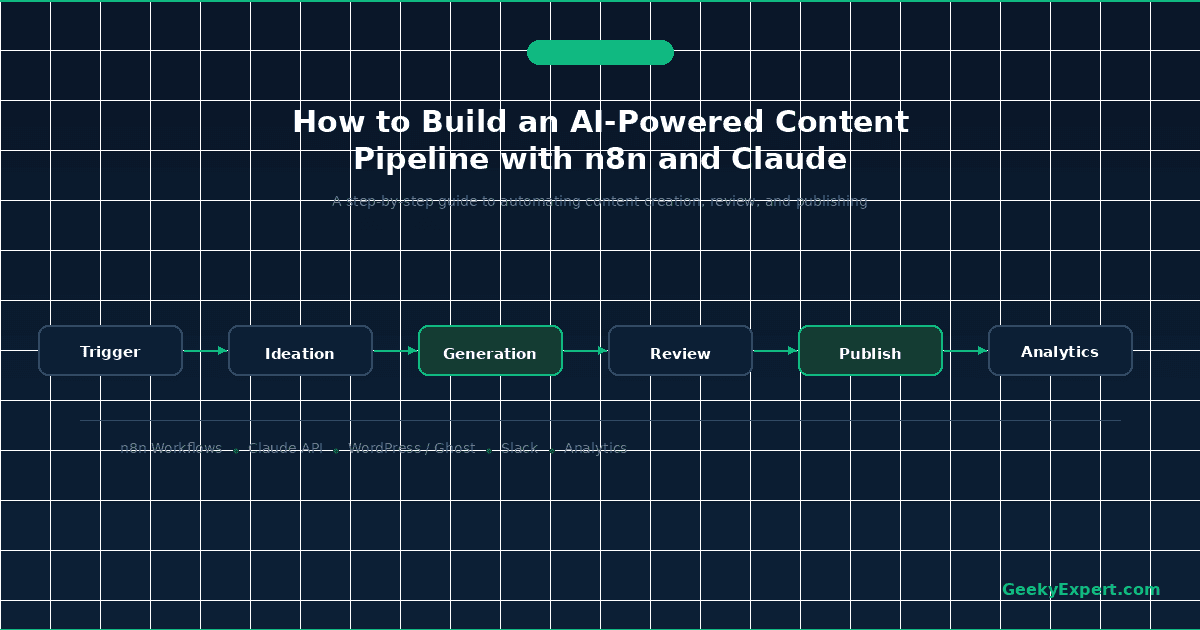
How do you build an AI content pipeline with n8n and Claude?
To build an AI-powered content pipeline with n8n and Claude, you self-host or subscribe to n8n (free Community edition or cloud from ~$24/month), connect the Anthropic Claude API via n8n's HTTP Request or built-in AI nodes ($3/million input tokens on Sonnet), build workflows that chain topic research, content generation, SEO optimization, quality review, and auto-publishing into a single automated pipeline. The full setup takes 4-8 hours and can produce 20-50 SEO-optimized articles per week at roughly $0.15-0.40 per article in API costs.
7-Step Pipeline Build
- ▸Step 1: Set up n8n -- self-hosted (Docker) or n8n Cloud
- ▸Step 2: Connect Claude API -- configure Anthropic credentials in n8n
- ▸Step 3: Build content generation workflow -- prompt chaining for drafts
- ▸Step 4: Add SEO optimization -- keyword injection, meta tags, schema
- ▸Step 5: Set up quality review -- automated fact-checking and scoring
- ▸Step 6: Auto-publish pipeline -- WordPress/CMS API integration
- ▸Step 7: Monitor and iterate -- analytics feedback loop
COST BREAKDOWN (2026)
| Component | Option A (Budget) | Option B (Cloud) |
|---|---|---|
| n8n Platform | Free (self-hosted Docker) | ~$24/mo Starter (2,500 executions) |
| Claude API (Sonnet) | $3 input / $15 output per MTok | $3 input / $15 output per MTok |
| Claude API (Haiku) | $1 input / $5 output per MTok | $1 input / $5 output per MTok |
| VPS Hosting (self-hosted) | $5-20/mo (Hetzner, DigitalOcean) | Included in n8n Cloud |
| Per-Article API Cost | ~$0.15-0.25 | ~$0.25-0.40 |
| Monthly Total (50 articles) | $12-25/mo | $36-45/mo |
PIPELINE ARCHITECTURE
AI Content Pipeline Architecture (n8n + Claude): TRIGGER (Cron / Webhook / Google Sheets) ↓ [1] TOPIC RESEARCH → Pull keywords from SEO tool API or spreadsheet → Claude analyzes search intent + competition ↓ [2] CONTENT GENERATION → Claude Sonnet drafts article (system prompt + examples) → Multi-pass: outline → sections → full draft ↓ [3] SEO OPTIMIZATION → Claude Haiku injects keywords, writes meta tags → Generate schema markup (JSON-LD) → Internal linking suggestions ↓ [4] QUALITY REVIEW → Claude scores readability + factual consistency → Flag low-confidence claims for human review → If score < threshold → loop back to generation ↓ [5] AUTO-PUBLISH → Format HTML/Markdown for CMS → Upload to WordPress/Ghost/Webflow via API → Schedule publication time ↓ [6] MONITOR → Track GSC impressions + clicks (7-day lag) → Feed performance data back to topic research → Iterate prompts based on top-performing content Estimated throughput: 20-50 articles/week Per-article API cost: $0.15-0.40 (Sonnet + Haiku mix) Human review time: 5-15 min/article (QA pass)
WHY THIS STACK
n8n vs. alternatives: • n8n: Open-source, self-hostable, unlimited workflows (free) • Zapier: $29.99/mo for 750 tasks, no self-hosting • Make: $10.59/mo for 10K ops, limited AI nodes • n8n wins: Full control, no per-task billing, native AI nodes Claude vs. alternatives for content: • Claude Sonnet: $3/$15 per MTok -- best quality-to-cost • GPT-4o: $2.50/$10 per MTok -- comparable, less nuanced • Gemini 2.0 Flash: $0.10/$0.40 per MTok -- cheap, lower quality • Claude wins: Superior long-form writing, follows style guides, 200K context window for reference material injection
Building an AI Content Pipeline with n8n and Claude in 2026
This GeekyExpert tutorial walks you through building a complete AI-powered content pipeline using n8n (open-source workflow automation) and the Anthropic Claude API. The pipeline automates every stage from topic research through publication and performance monitoring, producing 20-50 SEO-optimized articles per week at roughly $0.15-0.40 per article in API costs. n8n's execution-based pricing (free self-hosted, or approximately $24 per month on Cloud Starter with 2,500 executions) combined with Claude Sonnet at $3 per million input tokens and $15 per million output tokens makes this the most cost-effective AI content stack available in 2026.
Featured AI & Automation
Step 1: Set Up n8n -- Your Workflow Automation Engine

n8n is the open-source workflow automation platform that orchestrates your entire content pipeline. You have two deployment options: self-hosted (free, full control) or n8n Cloud (managed, approximately $24 per month on the Starter plan with 2,500 monthly workflow executions). For content pipelines, self-hosting on Docker is the recommended approach because it eliminates per-execution costs and gives you full control over data.
DOCKER COMPOSE SETUP
# docker-compose.yml
version: "3.8"
services:
  n8n:
    image: n8nio/n8n:latest
    restart: always
    ports:
      - "5678:5678"
    environment:
      - N8N_BASIC_AUTH_ACTIVE=true
      - N8N_BASIC_AUTH_USER=admin
      - N8N_BASIC_AUTH_PASSWORD=your-secure-password
      - N8N_HOST=your-domain.com
      - N8N_PROTOCOL=https
      - WEBHOOK_URL=https://your-domain.com/
      - GENERIC_TIMEZONE=America/New_York
    volumes:
      - n8n_data:/home/node/.n8n
volumes:
  n8n_data:
docker compose up -d, and access n8n at port 5678. Add a reverse proxy (Nginx or Caddy) with SSL for production use. Total setup time: 30-60 minutes.What You Should Know
The self-hosted route requires basic Docker and Linux administration skills. If your team lacks DevOps experience, n8n Cloud eliminates that overhead for $24/month. The 2,500-execution limit on Cloud Starter is sufficient for approximately 350 article pipeline runs per month (each article pipeline uses roughly 7 executions across nodes). For higher volume, the Pro plan at 10,000 executions supports approximately 1,400 articles per month.
Step 2: Connect the Claude API -- Your AI Content Engine

The Claude API from Anthropic is the intelligence layer that generates, optimizes, and reviews content in your pipeline. You will use two models: Claude Sonnet ($3 per million input tokens, $15 per million output tokens) for primary content generation, and Claude Haiku ($1 per million input tokens, $5 per million output tokens) for cheaper auxiliary tasks like meta tag generation and keyword extraction.
n8n CREDENTIAL SETUP
Step 1: Get your API key
  - Go to console.anthropic.com
  - Navigate to API Keys
  - Create a new key, copy it immediately
Step 2: Add credential in n8n - Open n8n → Credentials → Add Credential - Select "Header Auth" - Header Name: x-api-key - Header Value: sk-ant-api03-your-key-here
TOKEN COST CALCULATOR
| Task | Model | Est. Cost/Article |
|---|---|---|
| Outline generation | Sonnet | $0.02-0.04 |
| Full article draft | Sonnet | $0.08-0.18 |
| SEO meta tags | Haiku | $0.01-0.02 |
| Quality scoring | Haiku | $0.01-0.03 |
| Total per article | Sonnet + Haiku mix | $0.15-0.40 |
What You Should Know
Anthropic enforces rate limits: default tier allows approximately 40,000 output tokens per minute and 2,000 requests per minute. For batch content generation (producing 10+ articles simultaneously), add a Wait node (2-3 seconds) between API calls to avoid hitting rate limits. Prompt caching can reduce input costs by up to 90% if you reuse the same system prompt across articles -- pass the system prompt with cache_control enabled.
Step 3: Build the Content Generation Workflow -- Multi-Pass Drafting

The content generation workflow is the core of your pipeline. Instead of asking Claude to write an entire article in a single prompt (which produces generic, shallow content), you chain multiple specialized prompts that build the article progressively: topic analysis, outline generation, section-by-section drafting, and final assembly. This multi-pass approach produces dramatically better content because each stage focuses on one task.
WORKFLOW NODE CHAIN
Trigger (Cron: daily at 6 AM)
  ↓
Google Sheets Node (read next topic from content calendar)
  → Reads: keyword, target_audience, content_type, word_count
  ↓
HTTP Request #1 -- OUTLINE (Claude Sonnet)
  System prompt: "You are an expert content strategist..."
  User prompt: "Create a detailed outline for an article
    about [keyword] targeting [audience].
    Include H2/H3 structure, key points per section,
    and internal linking opportunities."
  ↓
Split In Batches Node (split outline into sections)
  ↓
HTTP Request #2 -- SECTION DRAFT (Claude Sonnet, looped)
  System prompt: "You are an expert content writer.
    Match this brand voice: [voice_doc].
    Write only the section described. No intro/outro."
  User prompt: "Write section: [section_title]
    Key points: [section_points]
    Target word count: [section_words]
    Previous sections for context: [prior_sections]"
  ↓
Merge Node (combine all sections into full article)
  ↓
HTTP Request #3 -- POLISH (Claude Sonnet)
  System prompt: "You are a senior editor..."
  User prompt: "Polish this article for flow and
    consistency. Fix transitions between sections.
    Ensure the introduction hooks the reader and
    the conclusion provides clear next steps.
    Article: [full_draft]"
What You Should Know
Single-prompt article generation (giving Claude one prompt and getting a complete article) produces content that reads like every other AI article on the internet. The multi-pass approach adds 2-3 extra API calls per article ($0.04-0.08 in cost) but produces content that is structurally sound, maintains consistent voice, and covers topics with depth that single-pass cannot match. The section-by-section loop also lets you customize depth per section -- spend more tokens on high-value sections and fewer on introductory material.
Step 4: Add SEO Optimization -- Keywords, Meta Tags, and Schema

After content generation, the SEO optimization step ensures every article is structured for search engine visibility. This step uses Claude Haiku (cheaper, faster) for structured extraction tasks: keyword density analysis, meta title and description generation, JSON-LD schema markup, and internal linking recommendations.
SEO OPTIMIZATION NODES
Full Article Draft (from Step 3)
  ↓
HTTP Request -- KEYWORD OPTIMIZATION (Claude Haiku)
  Prompt: "Analyze this article for the target keyword
    '[keyword]'. Return JSON:
    {
      'keyword_count': number,
      'keyword_density': percentage,
      'keyword_in_h2': boolean,
      'keyword_in_first_100_words': boolean,
      'suggested_lsi_keywords': string[],
      'missing_keyword_placements': string[]
    }"
  ↓
IF Node (keyword_density < 0.8% or > 2.5%)
  → Yes: HTTP Request -- REOPTIMIZE (Claude Haiku)
    "Naturally integrate the keyword '[keyword]'
     into these sections: [missing_placements]"
  → No: Continue
  ↓
HTTP Request -- META TAGS (Claude Haiku)
  Prompt: "Generate SEO meta tags for this article.
    Target keyword: [keyword]. Return JSON:
    {
      'meta_title': max 60 chars with keyword,
      'meta_description': max 155 chars with keyword
        and call-to-action,
      'og_title': string,
      'og_description': string,
      'slug': kebab-case URL slug
    }"
  ↓
HTTP Request -- SCHEMA MARKUP (Claude Haiku)
  Prompt: "Generate JSON-LD schema markup for this
    article. Include Article schema and FAQPage
    schema if the article contains FAQ content.
    Return valid JSON-LD."
  ↓
HTTP Request -- INTERNAL LINKS (Claude Haiku)
  Prompt: "Given this list of existing articles on
    the site: [article_list]. Suggest 3-5 internal
    links to add to this article. Return JSON:
    {
      'links': [{'anchor_text': '', 'target_url': '',
        'placement_context': ''}]
    }"
What You Should Know
Do not over-optimize. The SEO step should enhance content that is already well-written, not transform it into keyword-stuffed spam. Set guardrails: keyword density caps at 2.5%, no more than 5 internal links per article, and meta descriptions that read naturally. Google's Helpful Content system in 2026 prioritizes reader-first content. The SEO step is a polish, not a rewrite. Claude Haiku costs roughly $0.01-0.02 per article for all four SEO tasks combined, making this the cheapest step in the pipeline.
Step 5: Set Up Quality Review -- Automated Scoring and Human Gating

The quality review step is the guardrail that prevents low-quality content from reaching publication. It combines automated AI scoring with a human review gate -- articles above the quality threshold proceed to publishing, while those below are flagged for human intervention or routed back to the generation step for a rewrite.
QUALITY SCORING WORKFLOW
SEO-Optimized Article (from Step 4)
  ↓
HTTP Request -- QUALITY SCORE (Claude Haiku)
  System prompt: "You are a senior content editor.
    Score this article objectively."
  User prompt: "Score this article 1-10 on each
    criterion. Return JSON only:
    {
      'readability': number,
      'factual_confidence': number,
      'originality': number,
      'structure': number,
      'seo_compliance': number,
      'overall_score': number (average),
      'issues': string[] (specific problems found),
      'low_confidence_claims': string[]
}What You Should Know
Automated quality scoring is not a substitute for human judgment -- it is a triage tool that catches the worst content before it reaches a human reviewer. Some articles that score 8/10 will still need significant human editing, and some that score 6.5 might just need minor fixes. The value is in filtering: without the quality gate, your human reviewer wastes time on articles that should have been rewritten. With it, they focus on articles that are already 80-90% ready. The Slack integration ensures reviewers are notified immediately, keeping the pipeline moving.
Step 6: Auto-Publish Pipeline -- CMS Integration and Scheduling

The auto-publish step connects your pipeline to your CMS, formatting content and publishing it on schedule. This tutorial covers WordPress (most common), Ghost, and Webflow -- the n8n HTTP Request node works with any CMS that exposes a REST or GraphQL API.
WORDPRESS REST API PUBLISH NODE
HTTP Request Node -- PUBLISH TO WORDPRESS
  URL: https://your-site.com/wp-json/wp/v2/posts
  Method: POST
  Authentication: Basic Auth (Application Password)
  Headers:
    Content-Type: application/json
  Body (JSON):
  {
    "title": "{{ $json.meta_title }}",
    "content": "{{ $json.article_html }}",
    "status": "draft",
    "slug": "{{ $json.slug }}",
    "categories": [{{ $json.category_id }}],
    "meta": {
      "_yoast_wpseo_title": "{{ $json.meta_title }}",
      "_yoast_wpseo_metadesc": "{{ $json.meta_description }}"
    },
    "date": "{{ $json.scheduled_date }}"
}CMS COMPARISON FOR AUTO-PUBLISHING
| CMS | API Auth | SEO Meta Support | Scheduling |
|---|---|---|---|
| WordPress | Application Passwords | Via Yoast/RankMath meta | Native (status: future) |
| Ghost | Admin API + JWT | Native meta fields | Native (published_at) |
| Webflow | API Token | Custom CMS fields | Manual or Zapier trigger |
What You Should Know
Start with "draft" status for the first 2-4 weeks while you calibrate content quality. Only switch to "publish" or "future" (scheduled) status after your quality review step consistently produces articles that pass human review without major edits. WordPress Application Passwords are the simplest auth method but grant full API access -- create a dedicated user with Editor role for the pipeline. For enterprise deployments, use OAuth 2.0 or JWT-based authentication.
Step 7: Monitor and Iterate -- The Performance Feedback Loop

The monitoring step transforms your pipeline from a content factory into a self-improving system. By connecting Google Search Console (GSC) data back to your topic research and prompt engineering, you create a feedback loop where search performance informs what you write next and how you write it.
MONITORING WORKFLOW
Trigger (Cron: weekly, Monday 9 AM)
  ↓
Google Sheets Node (read published articles list)
  → Reads: article_url, publish_date, target_keyword
  ↓
HTTP Request -- GSC API (for each article)
  URL: https://searchconsole.googleapis.com/
    webmasters/v3/sites/[site]/searchAnalytics/query
  Body: {
    "startDate": "[7_days_ago]",
    "endDate": "[today]",
    "dimensions": ["query", "page"],
    "dimensionFilterGroups": [{
      "filters": [{
        "dimension": "page",
        "expression": "[article_url]"
      }]
    }]
  }
  ↓
Function Node -- ANALYZE PERFORMANCE
  // Categorize articles:
  // - High CTR (>5%): Winning format, replicate
  // - High impressions, low CTR: Rewrite title/meta
  // - Low impressions: Needs backlinks or topic shift
  // - Position 4-10: Optimize for featured snippets
  ↓
IF Node (needs_optimization == true)
  → Yes: Trigger content update workflow
    → Fetch current article from CMS
    → Claude Sonnet: "This article ranks position
      [pos] for [keyword]. Current title: [title].
      Impressions: [imp], clicks: [clicks], CTR: [ctr].
      Suggest improvements to increase CTR and ranking."
    → Update article via CMS API
  → No: Log performance data
  ↓
Google Sheets Node -- UPDATE PERFORMANCE LOG
  → Write: impressions, clicks, CTR, avg_position
  ↓
HTTP Request -- TOPIC INSIGHTS (Claude Haiku)
  Prompt: "Based on this performance data for our
    published articles: [performance_summary].
    Which topics should we double down on?
    Which keywords show opportunity (high impressions,
    low CTR)? Suggest 10 new article topics
    informed by this data."
  ↓
Google Sheets Node -- ADD TO CONTENT CALENDAR
  → Write suggested topics to content calendar
What You Should Know
The feedback loop takes 4-8 weeks to produce actionable data. Google needs time to crawl, index, and rank your content before GSC shows meaningful metrics. Do not optimize prematurely -- wait until an article has at least 2-4 weeks of GSC data before making changes. Over-optimizing based on insufficient data can hurt rankings. Start by logging performance data weekly and making optimization decisions monthly. As your dataset grows, you can increase optimization frequency.
Frequently Asked Questions
How much does an AI content pipeline with n8n and Claude cost?
The total cost depends on your n8n hosting choice and content volume. Self-hosted n8n is free (you pay only for VPS hosting at $5-20 per month on Hetzner or DigitalOcean). n8n Cloud Starter costs approximately $24 per month for 2,500 workflow executions, and Pro costs approximately $60 per month for 10,000 executions.
Claude API costs are usage-based: Sonnet at $3 per million input tokens and $15 per million output tokens for primary content generation, Haiku at $1 per million input tokens and $5 per million output tokens for SEO tasks and quality scoring. A typical 1,500-word article costs $0.15-0.40 in API calls using a Sonnet/Haiku mix. At 50 articles per week (approximately 200 per month), expect $30-80 per month in API costs.
Total monthly budget: $35-100 for a pipeline producing 200 SEO-optimized articles, compared to $10,000-30,000 for equivalent freelance writer output.
Can I use GPT-4 instead of Claude for the content pipeline?
Yes, the n8n workflow architecture works with any LLM API -- you swap the HTTP Request node endpoint and payload format. GPT-4o costs $2.50 per million input tokens and $10 per million output tokens, slightly cheaper than Claude Sonnet ($3/$15). GPT-4o-mini at $0.15/$0.60 per million tokens is significantly cheaper for auxiliary tasks.
However, Claude Sonnet consistently produces more nuanced long-form content, follows complex style guides and brand voice documents more reliably, and handles the full 200K context window effectively for reference material injection. Many teams use a hybrid approach: Claude Sonnet for primary content generation (where quality matters most) and GPT-4o-mini or Claude Haiku for structured extraction tasks like meta tags, keyword analysis, and quality scoring.
The n8n workflow supports mixing models across different nodes.
How many articles can this pipeline produce per day?
The pipeline can technically produce 50-100 articles per day with no human bottleneck, limited primarily by API rate limits and n8n execution capacity. Claude API rate limits on the default tier allow approximately 40,000 output tokens per minute. A 1,500-word article uses roughly 3,000-4,000 output tokens across multiple API calls, supporting 10-13 complete articles per minute at maximum throughput.
With rate limit headroom and processing time, realistic automated throughput is 200-500 articles per day. The practical bottleneck is quality: human review at 5-15 minutes per article limits realistic throughput to 20-50 reviewed articles per day with one dedicated reviewer. Most content teams target 5-10 high-quality, human-reviewed articles per day as a sustainable pace that balances volume with editorial standards.
Is n8n better than Zapier or Make for AI content pipelines?
n8n is the best choice for AI content pipelines for three reasons. First, cost: self-hosted n8n is free with unlimited workflows and executions, while Zapier starts at $29.99 per month for only 750 tasks and Make (Integromat) at $10.59 per month for 10,000 operations. A content pipeline that produces 10 articles per day uses roughly 70 workflow executions, which would cost $0 on self-hosted n8n, exhaust Zapier's Starter plan in 10 days, and use 70% of Make's monthly allocation in one day.
Second, complexity handling: n8n supports branching, looping, error handling, and code execution nodes that content pipelines require for multi-pass generation and quality review loops. Zapier's linear path architecture cannot handle the loop-back logic needed for quality scoring. Third, n8n's built-in AI nodes and JavaScript/Python code execution let you process content without external services.
The trade-off is setup complexity: n8n requires more technical skill than Zapier's drag-and-drop builder.
Will Google penalize AI-generated content from this pipeline?
Google's official guidance since 2023, reaffirmed in 2025 and 2026, states that AI-generated content is not inherently penalized. Google evaluates content on helpfulness, reliability, and people-first quality regardless of production method. The Helpful Content system penalizes low-quality, thin, or spammy content whether written by humans or AI.
This pipeline includes specific safeguards: the SEO optimization step ensures proper on-page structure, the quality review step scores articles on factual confidence and originality, and the human review gate catches content that does not meet editorial standards.
Best practices for avoiding penalties: always have a human verify factual claims before publication, add original expert insights and proprietary data that AI cannot generate, maintain proper E-E-A-T signals (author bios, expert attribution, source citations), and never publish purely AI-generated content on YMYL topics (health, finance, legal) without expert review and verification.
How do I scale this pipeline for an agency or multiple clients?
To scale the pipeline for agency use with multiple clients, implement three architectural changes. First, organize n8n workflows by client using project folders (available on n8n Pro at approximately $60 per month for 10,000 executions) or separate workflow groups with client-prefixed names. Each client gets isolated credential sets and CMS connections.
Second, create a client configuration database (Google Sheets, Airtable, or PostgreSQL) storing per-client brand guidelines, tone-of-voice documents, target keywords, CMS API credentials, and publishing schedules. The pipeline reads client config at runtime, so one workflow template serves all clients. Third, build modular CMS publish nodes using n8n's Switch node to route to WordPress, Ghost, Webflow, or Shopify based on client configuration.
Most agencies run 5-10 client pipelines on a single n8n Pro instance. For 20+ clients or high volume (1,000+ articles per month total), self-host n8n on a dedicated server with 4+ vCPU and 8GB RAM, or use n8n Business tier for team collaboration features.
About Geeky Expert
Geeky Expert is a leading provider of research and insights, dedicated to helping businesses make informed decisions through comprehensive analysis.